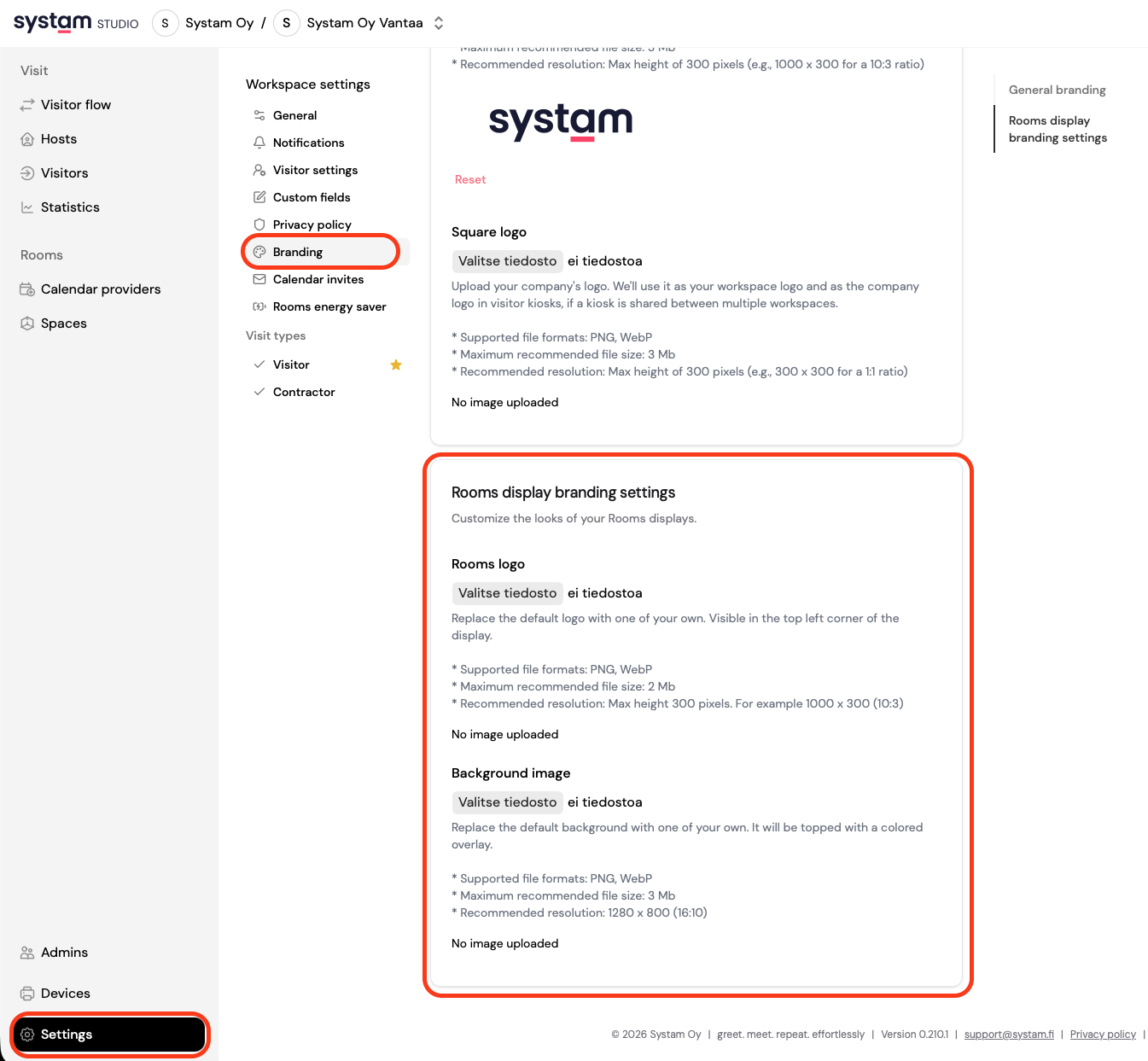
Want to customize the look of your Rooms display? You can easily update both the logo and background image in just a few clicks.
Where to find the settings
Go to:
Settings → Branding → Rooms display branding settings
Change the Rooms logo
The logo appears in the top-left corner of the Rooms display.
- Open Rooms display branding settings
- Find Rooms logo
- Click Select file
- Upload your logo
Please note:
- Supported formats: PNG, WebP
- Recommended max file size: 2 MB
- Recommended height: max 300 px (e.g. 1000 × 300)
Change the background image
The background image fills the entire Rooms display and is shown under a color overlay.
- Open Rooms display branding settings
- Find Background image
- Click Select file
- Upload your background image
Please note:
- Supported formats: PNG, WebP
- Recommended max file size: 3 MB
- Recommended resolution: 1280 × 800
Tip
Keep your logo simple and your background image clean. This helps keep the screen easy to read.
Was this article helpful?
That’s Great!
Thank you for your feedback
Sorry! We couldn't be helpful
Thank you for your feedback
Feedback sent
We appreciate your effort and will try to fix the article